Category: VCF Orchestrator

VCF Orchestrator Node.js Environment Variables

In this blog post, we will explore how to use environment variables in a Node.js script running inside Broadcom VMware VCF Orchestrator. Environment variables are a great way to configure your scripts without hardcoding values, making your code more flexible and secure.

Environment Variables in VCF Orchestrator

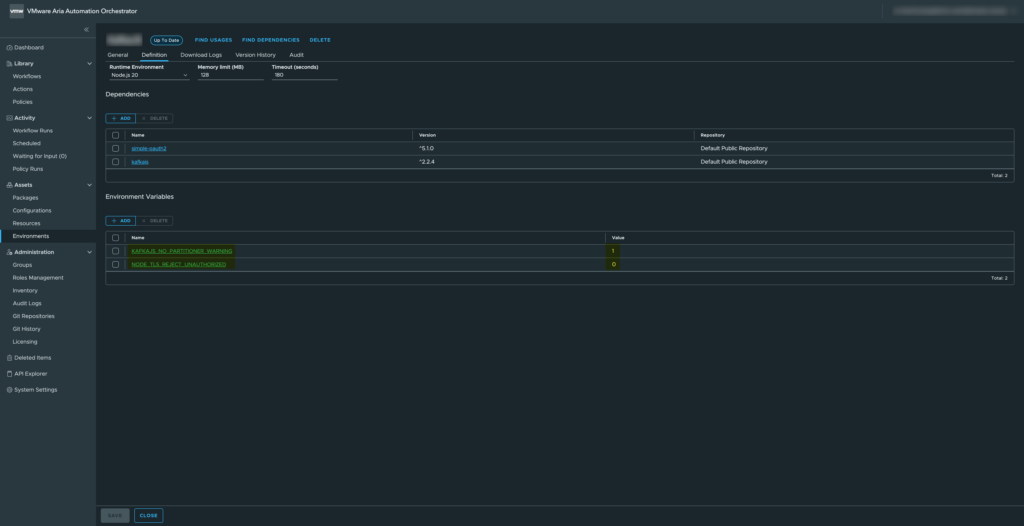
For this example, we will use two environment variables available in the VCF Orchestrator environment.
– KAFKAJS_NO_PARTITIONER_WARNING
– NODE_TLS_REJECT_UNAUTHORIZED

These variables are commonly used when integrating with Kafka or handling TLS certificates in Node.js.
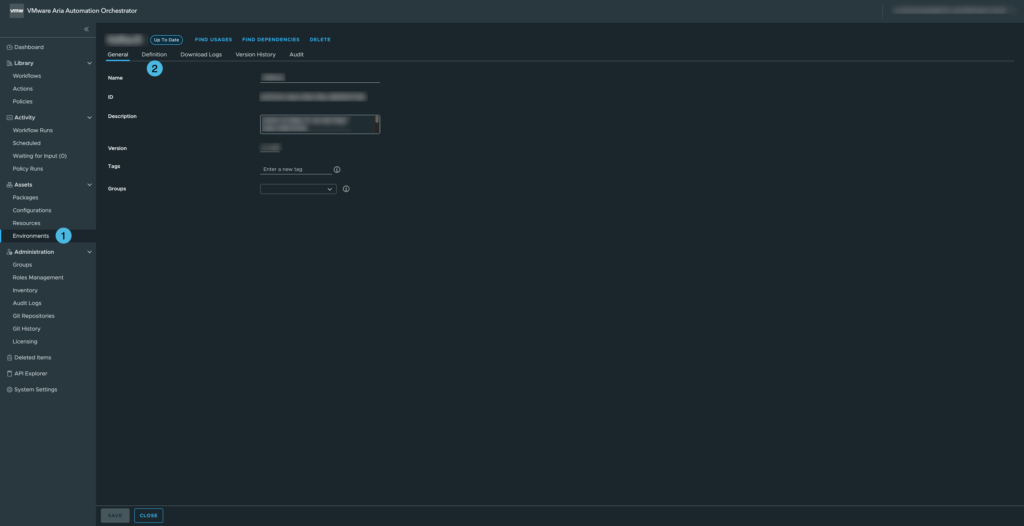
01 - VCF Orchestrator - Node.JS - Environment variables
VCF Orchestrator – Node.JS – Environment variables
02 - VCF Orchestrator - Node.JS - Setting environment variables
VCF Orchestrator – Node.JS – Setting environment variables

Loading and Validating Environment Variables

Below is a function that retrieves these environment variables and validates their values:

// Load container environment variables
const loadEnvs = () => {
    const { KAFKAJS_NO_PARTITIONER_WARNING, NODE_TLS_REJECT_UNAUTHORIZED } = process.env;

    // Validation: only "0" or "1" are allowed
    if (!['0', '1'].includes(KAFKAJS_NO_PARTITIONER_WARNING)) {
        throw new Error(`${LOG_PREFIX} Invalid KAFKAJS_NO_PARTITIONER_WARNING value: ${KAFKAJS_NO_PARTITIONER_WARNING}`);
    }
    if (!['0', '1'].includes(NODE_TLS_REJECT_UNAUTHORIZED)) {
        throw new Error(`${LOG_PREFIX} Invalid NODE_TLS_REJECT_UNAUTHORIZED value: ${NODE_TLS_REJECT_UNAUTHORIZED}`);
    }

    // Return the validated variables
    return { KAFKAJS_NO_PARTITIONER_WARNING, NODE_TLS_REJECT_UNAUTHORIZED };
};

Explanation: We destructure the variables directly from process.env. Validation ensures the variables are either “0” or “1” only, preventing invalid configurations. The function returns an object with the validated variables, which can be safely used in your script.

Using the Environment Variables

Once loaded, you can use these variables in your Node.js script like this:

// Load environment variables
const envs = loadEnvs();

console.log(`${LOG_PREFIX} Setting environment variable KAFKAJS_NO_PARTITIONER_WARNING=${envs.KAFKAJS_NO_PARTITIONER_WARNING}`);
console.log(`${LOG_PREFIX} Setting environment variable NODE_TLS_REJECT_UNAUTHORIZED=${envs.NODE_TLS_REJECT_UNAUTHORIZED}`);

This allows you to reference the environment variables throughout your script, for example to configure KafkaJS behavior or TLS certificate validation.

Why This Approach Is Useful

  • Centralized configuration: No hardcoding; variables can be changed per environment.
  • Fail-fast validation: The script throws an error immediately if a variable has an invalid value.
  • Secure defaults: Particularly important for TLS and security-related flags.
  • Reproducibility: Works consistently across VCF Orchestrator containers.

This setup ensures that your Node.js scripts in VCF Orchestrator are flexible, secure, and maintainable, while keeping the environment-specific configuration outside your code.

VCF Orchestrator the JavaScript week-number

While working with Broadcom VMware Cloud Foundation (VCF) Orchestrator, formerly known as vRealize Orchestrator, I ran into a subtle but very real problem: week numbers that did not match what we expect in The Netherlands.

At first glance this looked like a bug in the platform. In reality, it turned out to be a classic JavaScript date-handling pitfall that becomes especially visible in automation workflows.

The issue: week numbers don’t line up

In one of my Orchestrator workflows I evaluated two timestamps:

  • 2025-02-17 20:39:00.000 +01:00 → returns week 7
  • 2025-02-18 20:39:00.000 +01:00 → returns week 8

From a Dutch perspective, both dates fall in week 8. So why does JavaScript suddenly jump a week overnight?

ISO-8601 vs local expectations

The answer lies in how JavaScript (and most supporting libraries) determine week numbers.

JavaScript itself does not have a native getWeek() function, but most common implementations follow the ISO-8601 standard:

  • Weeks start on Monday
  • Week 1 is the first week of the year that contains at least four days in the new year
  • Week boundaries are calculated relative to Thursday

For 2025, that leads to the following result:

  • Monday, February 17, 2025 → still ISO week 7
  • Tuesday, February 18, 2025 → ISO week 8

So while this feels “wrong” locally, JavaScript is technically correct according to ISO-8601.

Why this matters in VCF Orchestrator

In Broadcom VMware VCF Orchestrator, JavaScript is often used to:

  • Schedule tasks
  • Generate weekly reports
  • Drive time-based logic in workflows
  • Integrate with external systems like ITSM or ticketing platforms

If your organization assumes Dutch calendar logic without explicitly coding for it, you can end up with off-by-one-week errors that are extremely hard to trace later.

The solution: make the week calculation explicit

To avoid ambiguity, I implemented an explicit ISO-week calculation in JavaScript and documented it clearly in the action itself. This ensures that anyone reading or reusing the code understands exactly which standard is applied.

Here is the action I use in Orchestrator:

function calculateCurrentWeek(dateNow) {
	function getISOWeekNumber(date) {
	    var d = new Date(date.getTime());
	    d.setHours(0, 0, 0, 0);
	    
	    // Adjust to the Thursday of the current week
	    d.setDate(d.getDate() + 3 - (d.getDay() || 7));
	
	    // Find the start of the year (first Thursday's week)
	    var yearStart = new Date(d.getFullYear(), 0, 4);
	    yearStart.setDate(yearStart.getDate() + 3 - (yearStart.getDay() || 7));
	
	    // Calculate the week number
	    var weekNumber = Math.round(((d - yearStart) / 86400000) / 7) + 1;
	
	    return weekNumber;
	}
	
	// Set variable
	var actionName = arguments.callee.name.substr(6);
	
	// Input validation
	if (!(dateNow instanceof Date)) {
	    throw new Error("[" + actionName + "] 'dateNow' must be a Date object");
	}
	
	// Calculate the week number
	var weekNumber = getISOWeekNumber(dateNow);
	
	// Return the result
	return weekNumber;
	
}

Takeaway

This is not a bug in Broadcom VMware VCF Orchestrator, nor in JavaScript itself. It is a reminder that date logic is never “obvious” in automation.

If your workflows depend on week numbers:

  • Decide explicitly which standard you use (ISO vs local convention)
  • Document that choice in your actions
  • Never rely on “what feels correct” for calendar logic

In automation platforms like VCF Orchestrator, these small details can make the difference between predictable workflows and subtle production issues that surface weeks later.